
Since 7 October 2026, Pokémon FireRed and LeafGreen on Nintendo Switch can send their Pokémon to Pokémon HOME. It’s a good opportunity to take stock of this storage service, which can be confusing. Which plan to pick, which games are compatible, which way transfers go and which pitfalls to avoid: here is the complete guide to moving your Pokémon around without any nasty surprises.
What exactly is Pokémon HOME?
Pokémon HOME is the series’ big “cloud.” Under a single Nintendo Account, this service brings together the Pokémon caught in Switch games, in Pokémon GO and, until it shuts down, in Pokémon Bank from the 3DS era. It comes in two complementary versions, linked to the same account:
- The Nintendo Switch version: this is the one that talks to the Switch games. You deposit Pokémon into it and withdraw them from your cartridges and downloaded games.
- The mobile version (iOS and Android): this is the logbook. It handles online trades, Mystery Gifts, the detailed National Pokédex, battle data and the delivery of Pokédex rewards.
In short, you move your Pokémon on Switch, and you trade or claim your gifts on your smartphone.
Free or Premium: which one should you choose?
The app is free, but the basic plan is very limited. Here are the differences, according to The Pokémon Company’s official table:
| Feature | Free | Premium |
|---|---|---|
| Pokémon you can store | 30 | 9,000 (since version 4.1.0) |
| Deposits in the Wonder Box | 3 | 10 |
| Deposits in the GTS | 1 | 3 |
| Group Trades | Join | Join and host |
| Judge function (stat evaluation) | No | Yes |
| Transfer from Pokémon Bank | No | Yes |
The Premium Plan costs €2.99 for one month, €4.99 for three months and €15.99 for one year on the Nintendo eShop (France prices). Update 4.1.0 raised its capacity from 6,000 to 9,000 Pokémon without changing the prices.
Our advice: the free plan is enough to claim a gift or to move a few Pokémon from one game to another, 30 at a time. If you want to empty an old save file, bring over your Pokémon Bank or complete a Pokédex, a three-month subscription at €4.99 is often the best value: you do all your transfers in one go.
Compatible games and transfer directions
A basic rule to keep in mind: a Pokémon can only enter a game if its species exists in that game. Beyond that, each title has its own rules for what goes in and out.
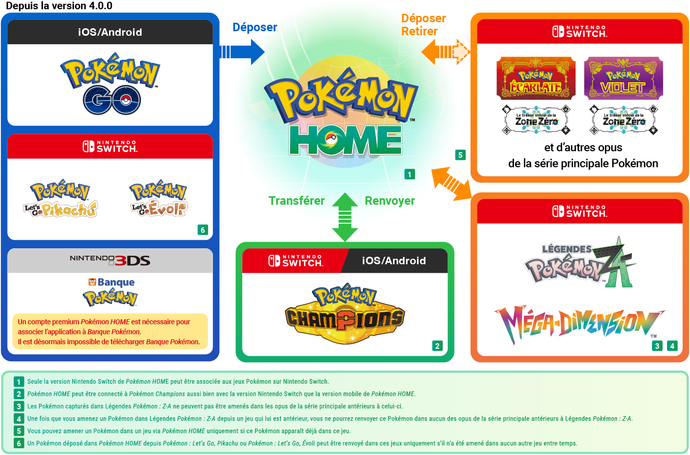
Two-way games
- Pokémon Sword and Shield: deposits and withdrawals are possible, as long as the species is on the game’s list of transferable Pokémon. Hisuian forms, for example, can’t get in.
- Pokémon Brilliant Diamond and Shining Pearl: deposits and withdrawals, but only Pokémon from the first four generations (No. 1 to 493) can enter, without regional forms.
- Pokémon Legends: Arceus: deposits and withdrawals, only for species in the Hisui Pokédex. A Pokémon that enters it receives a Strange Ball.
- Pokémon Scarlet and Violet: deposits and withdrawals. On arrival, the Tera Type of a Pokémon coming from another game is determined by its original type or types.
Games to handle with care
- Pokémon: Let’s Go, Pikachu! and Let’s Go, Eevee!: trades with HOME work in both directions. But a Pokémon that originated in Let’s Go and has been sent to another game can never return to Let’s Go. The partner Pokémon, for its part, can’t leave the game.
- Pokémon Legends: Z-A (compatible since version 4.0.0): only Pokémon from the Lumiose Pokédexes can enter, and only the Switch version of HOME connects to the game. Most importantly, a Pokémon from another game that enters Z-A can no longer go back to earlier games, and Pokémon born in Z-A can’t go to older games.
- Pokémon Champions: it works in a special way. A Pokémon sent to Champions “pays a visit” to the game but stays registered in HOME. During this visit, it is locked: you can’t transfer it elsewhere, trade it or release it.
One-way transfers
- Pokémon GO: Pokémon go from GO to HOME, never the other way around.
- Pokémon Bank: it lets you bring over Pokémon from the 3DS (Pokémon Sun and Moon, Ultra Sun and Ultra Moon, X and Y, Omega Ruby and Alpha Sapphire, and Virtual Console games). This transfer is one-way and reserved for Premium. Be careful: Pokémon Bank will shut down for good on 26 February 2027 at 4:00 a.m. (Paris time). After that date, no more transfers will be possible.
- Pokémon FireRed and LeafGreen (Switch, since 7 October 2026): your Kanto Pokémon can join HOME, then recent games. It’s a one-way trip: they can never return to FireRed or LeafGreen, and no Pokémon from another game can enter them.
FireRed and LeafGreen: how to do it (and Celebi)
To take advantage of the new compatibility, first update Pokémon HOME to version 4.1.0 on your Switch, then connect your FireRed or LeafGreen save from the app. Next, choose the Pokémon to deposit. Think carefully before emptying your boxes: a  Charizard sent from Kanto to Scarlet and Violet will never return to its original game.
The big gift in this update is for completionists. If you’ve completed the Pokédex in FireRed or LeafGreen, you can receive  Celebi at Lv. 50 in the mobile version of Pokémon HOME. There’s no need to transfer your Pokémon for this: once the game is connected, every species registered in its Pokédex is also registered in HOME’s.
Pokémon GO and the GO Transporter
Sending your Pokémon GO catches to HOME is free, with no subscription. In Pokémon GO, open the menu (Poké Ball), then Settings and Pokémon HOME, and log in with the Nintendo Account linked to HOME. Pokémon then go through the GO Transporter.
- Energy: each transfer uses up GO Transporter energy. The gauge goes up to 10,000 points and recharges over time, at about 60 points per hour according to community measurements. So you should count on about a week for a full recharge, unless you pay for a recharge with PokéCoins.
- The cost: a regular Pokémon costs at least 10 points, a Legendary at least 1,000 and a Mythical at least 2,000. The cost rises with CP, and a Shiny costs noticeably more.
- Exclusions: you can’t send favorites, your buddy, Gym defenders, costumed Pokémon, Shadow Pokémon, Mega Evolved Pokémon or
 Spinda.
 - New in version 4.1.0: Pokémon caught with a Safari Ball in GO can now join HOME, where their Ball becomes a Strange Ball.
Your first transfer from GO unlocks a Mystery Box, which makes  Meltan appear in Pokémon GO and can be opened again after seven days by sending another Pokémon. A first transfer from GO to HOME also earns you a
  Melmetal able to Gigantamax.
Trades: GTS, Wonder Box and groups
The mobile version of HOME offers four ways to trade:
- The GTS: you deposit a Pokémon and state which one you want in return, even if it’s not yet in your Pokédex (1 deposit on the free plan, 3 with Premium).
- The Wonder Box: random trades with players around the world, even when the app is closed (3 deposits on the free plan, 10 with Premium).
- Group Trades: up to 20 participants, and you only find out which Pokémon you received at the end. You need a Premium account to create a group.
- Friend Trades: with the players on your HOME friends list.
Gifts you shouldn’t miss
Pokémon HOME regularly rewards players who transfer Pokémon or complete their Pokédexes. Here are the gifts currently on offer (check the Mystery Gift tab in the mobile app):
- First transfer from Scarlet and Violet:
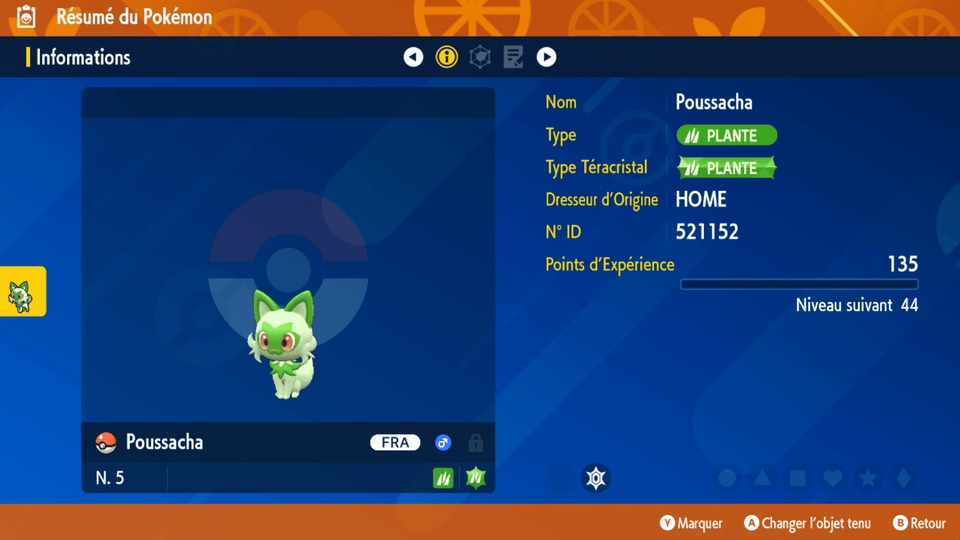
 Sprigatito,
  Fuecoco and
  Quaxly with their Hidden Ability;
 - First transfer from Pokémon Legends: Z-A: Alpha
 Chikorita,
  Tepig and
  Totodile;
 - Completed Pokédexes (Shiny, Lv. 50):
 Meloetta for Scarlet and Violet,
  Enamorus for Pokémon Legends: Arceus,
  Manaphy for Brilliant Diamond and Shining Pearl,
  Keldeo for Sword and Shield, and Meltan for Let’s Go;
 - All three Pokédexes of Pokémon Legends: Z-A: a Shiny
 Volcanion;
 - FireRed and LeafGreen Pokédex: Celebi.
For competitive players, a campaign also links Z-A and Pokémon Champions: by transferring to Champions a  Chesnaught, a
  Delphox, a
  Greninja or an
  Eternal Flower Floette obtained in Z-A, you receive the corresponding Mega Stone in Champions, one per transferred Pokémon.
Pitfalls to avoid
- Irreversible transfers: GO, Pokémon Bank and FireRed and LeafGreen only work one way. Pokémon from Let’s Go and those that enter Z-A can’t return to earlier games. Before a big transfer, ask yourself whether you’ll ever want that Pokémon back in its original game.
- Held items: when leaving Brilliant Diamond and Shining Pearl, Sword and Shield, Scarlet and Violet or Z-A, the held item goes back to your Bag. Beyond 999 copies of an item, the surplus is lost.
- Moves: they may be replaced when entering a game (a move unknown to the game can’t be kept), then restored when the Pokémon returns to HOME.
- The Champions lock: a Pokémon visiting Champions can neither be traded nor sent to another game.
- The Pokémon Bank deadline: 26 February 2027. If your 3DS Pokémon are still sleeping in the Bank, plan on one month of Premium before that date.
Key takeaways
Pokémon HOME has become the essential crossing point for your whole collection. The free account is enough for small moves and gifts. Premium (from €2.99 per month) becomes indispensable for a big transfer, especially before Pokémon Bank shuts down in February 2027. Above all, keep the one-way trips in mind: FireRed and LeafGreen, GO, Pokémon Bank and Z-A won’t give back the Pokémon you take out of them.
Sources: official Pokémon HOME website, compatible games, trades, Pokémon GO help