[Back to the Pokémon France home page] Games > Ruby and Sapphire > Action Replay Codes > Explanation with Emulation
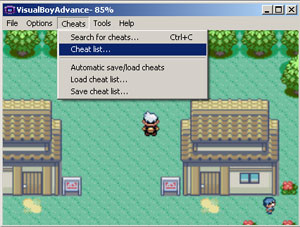
Okay, I’m going to explain how to use Action Replay codes on the Game Boy Advance emulator called "Visual Boy Advance"! 🙂 First, load the ROM in Visual Boy Advance, just like you already know how to do! 🙂 Then go to the "Cheats" menu, and click "Cheat List…"
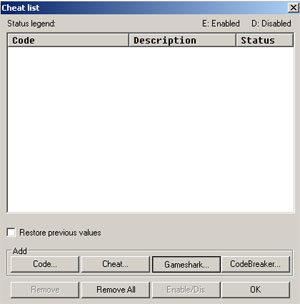
Once that’s done, a window appears … Click "GameShark"!
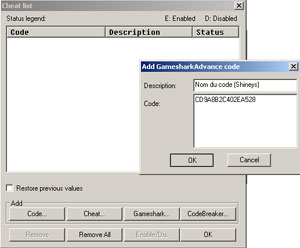
Here, you need to enter a name for the code (this is optional)
and then the code itself …
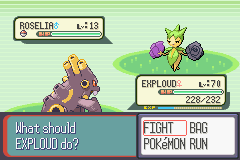
Then just press OK everywhere and go back to the game! 🙂 And there we go, I’m facing a Shiny Roselia ! 🙂
………………………………………………………… |
Pokémon Ruby, Sapphire and Emerald › How to Use Action Replay Codes 27 pages
- Soluce Littleroot Town: The Big Start
- Soluce Route 102 and Petalburg City: Norman and Wally
- Soluce Petalburg Woods and Rustboro City: Roxanne
- Soluce Rusturf Tunnel and Dewford Town: Brawly
- Soluce Slateport City and Mauville City: Wattson
- Soluce From the Desert to Mt. Chimney
- Soluce Lavaridge Town: Flannery and the Heat Badge
- Soluce Petalburg City: Norman and the Balance Badge
- Soluce Fortree City: Winona and the Feather Badge
- Soluce Lilycove City and Mt. Pyre
- Soluce The Team Hideout and the Master Ball
- Soluce Mossdeep City: Tate, Liza and the Mind Badge
- Soluce The Seafloor Cavern and the Awakening of the Legends
- Soluce Sootopolis City: The Crisis and the Rain Badge
- Soluce Ever Grande City and Victory Road
- Soluce The Ever Grande League: The Elite Four and the Champion
- Soluce Hoenn's Legendary Pokémon
- Soluce The Battle Frontier and the Battle Tower
- Soluce Pokémon Contests, Berries and Pokéblocks
- Soluce Hoenn's Secrets
- Actionreplay How to Use Action Replay Codes
- Tips and secrets Capture Tips for Ruby and Sapphire
- Tips and secrets Tips on locations for Ruby and Sapphire
- Tips and secrets Useful tips for Ruby and Sapphire
- Tips and secrets Pokémon Ruby and Sapphire FAQ
- Pokemon_disponibles Index
- Tips and secrets Action Replay Codes for Pokémon Ruby and Sapphire (English Version)